

Introduction to tidoly PaaS
As easy as the cloud, on your own infrastructure
There is already plenty of good open source. The problem is that it doesn't end with installation.
You have to connect a database, create accounts, attach a domain, issue certificates, take backups, and bring things back when something breaks.
tidoly PaaS handles this work for you. It makes deploying, connecting, and operating the services you need on your own server as simple as the cloud.
You want to use open source, but operations are the problem
Open source offers many good services. Git repositories, chat, documents, file storage, business systems, databases — you can build almost everything you need yourself.
But every time you install a service, extra work comes with it.
- You have to prepare a server.
- You have to connect a database.
- You have to manage logins and accounts.
- You have to set up a domain and HTTPS.
- You have to check the resources each service needs.
- You have to prepare backup and recovery, too.
When you run several services, this work repeats over and over. In the end, the time spent operating services grows larger than the time spent using them.
tidoly was built to cut down exactly this.
Especially well suited to teams like these
| The problem you face now | What tidoly does |
|---|---|
| Your data cannot live outside your organization | Lets you run services inside your own infrastructure while managing them like the cloud |
| Cloud costs are a burden | Lets multiple services share resources on a single server |
| Subscriptions and accounts pile up for every service | Installs the open source you need in one place and manages it under a single account system |
| No one is dedicated to DevOps | Reduces repetitive operations work such as installing, connecting, addresses, certificates, and backups |
| You already use a lot of open source | Lets you manage scattered services and resources in one place |
In the end, the question is not which service to use, but how to keep running it.
tidoly does not build the services themselves. It takes open source that is already well made and makes it easy to install, connect, and operate.
What it handles for you, one by one → Features
Install many services without managing each one separately
For example, imagine your team uses the following services.
Git repository + internal chat + documents + file storage + database
Traditionally, each service installs differently, needs its own accounts, and needs its own database and storage connected. When someone joins the team, you invite them to several services; when they leave, you clean up accounts in several places.
With tidoly, you install the services you need in one place and manage them together inside one project.
The difference is biggest when you start several services at once from the beginning. Instead of creating accounts per service and inviting teammates separately, the services you install are connected to a single account system from the start. When people join or leave, you manage it in one place.
Apps don't need to know the database address
tidoly's core is not just installing services. It also takes care of connecting services to each other.
Just because an app uses a database doesn't mean you have to type in its address, account, and password. You only choose what to connect to.
For example, when you install Gitea, the database schema and login integration it needs are connected along with it.
| Received resource | Provided by | Status |
|---|---|---|
SCHEMA gitea_509655 | Installed PostgreSQL | BOUND |
OIDC_CLIENT gitea | Login server | BOUND |
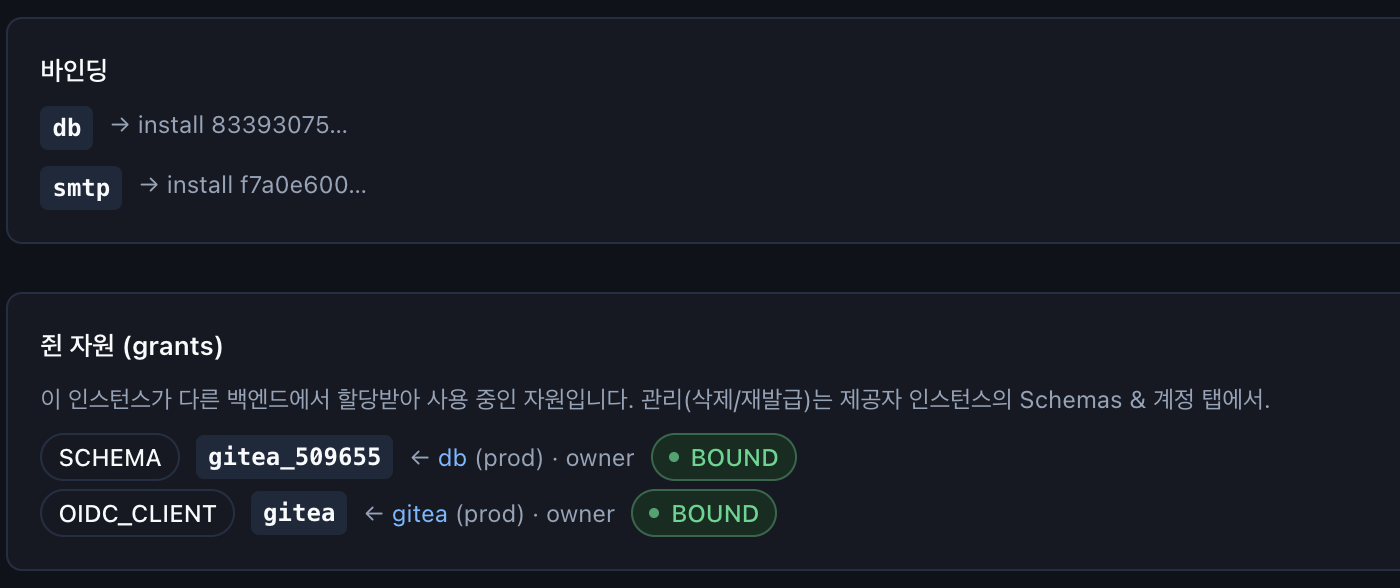
The app doesn't need to know where the database actually is. Whether it's a database installed on your server or an external cloud resource you already use, the app connects the same way.
When a connected value changes, the app restarts, and sensitive values such as passwords are passed only to the app without being shown on screen again. So even if you move the resource later, you don't need to change the app code.
So operations become this simple
With tidoly, complex infrastructure work boils down to the following flow.
Prepare a server → Install tidoly → Create a project → Choose services → Connect the resources you need → Use
Even as services grow, the basic approach stays the same. If you need a database, connect it; if you need login, connect it; if you need an external service, register it.
When you choose the services you need, tidoly takes care of the connections between them and the work needed to operate them. This is what tidoly means by "As easy as the cloud, on your own infrastructure."
You can start with a single server
There's no need to build a complex cluster from the start. During the beta, the guide is based on a single server.
| Start | Scale |
|---|---|
| Install the services you need on one server | Scale out to multiple servers when you need to |
| Multiple services share resources | Cluster setup is supported on request |
| Back up, and restore when needed | → Support |
Rather than building large infrastructure from the start, we recommend checking whether your team's stack actually runs on a single server. It's not too late to add hardware when you need it.
While the server is off, services are unreachable, but when you turn it back on, installed services and data remain as they were.
You don't have to move everything at once
Adopting tidoly doesn't mean changing your existing environment all at once. The least burdensome approach is to start with development and staging environments.
| Step | What do you do? |
|---|---|
| 1. Try it first | Set up your team's current development and staging environments on tidoly |
| 2. See for yourself | Check whether all the services you need come up and how much hands-on operation they require |
| 3. Move one at a time | Move services to the prod environment starting with those you've verified thoroughly |
| 4. Scale when needed | When services or users grow, scale your servers and infrastructure at that point |
For development environments, you can also keep the server on only when you need it. Installed services and data remain even if you turn the server off and on. Only the services that must always be reachable from outside need to stay on.
From installation to operations, do only as much as you need
The basic tidoly installation process isn't complicated.
| Step | What do you do? | Can you skip it? |
|---|---|---|
| 0 | Prepare a server — Install Ubuntu | Skip if you already have a Linux server |
| 1 | License and domain — Decide the address to use | Required |
| 2 | Install the system — Install tidoly with the installation wizard | Required |
| 3 | Projects and status — Create a workspace and check its status | Required |
| 4~5 | Install a bundle at once or install services one by one | As much as you need |
| 6 | Deploy your own app — Connect a Git repository, then build and deploy | When needed |
| 7~9 | Register external services · Connect resources · Set up addresses and certificates | When needed |
| 10 | Build apps with AI tools — The AI in your editor creates everything from resource installation to addresses | When needed |
| + | Open source — Open source you can install and its official usage guides | When needed |
TIP
Tasks that vary by environment, such as router settings or disk expansion, are separated into Advanced.
The basic installation process covers only what is essential to get services started.
The hardware you need isn't big either
If you already have a server, you can use it as is. If you run several services together, we recommend roughly the following specs.
| Item | Recommended |
|---|---|
| CPU | 8 cores |
| Memory | 8GB |
| Disk | 100GB |
If builds and deployments also run on the same server, we recommend 10GB of memory or more.
The specs you actually need can vary depending on the type and number of services you install, data volume, traffic, and so on.
You can cut costs, too
One of the biggest reasons to use tidoly is that you can run multiple services together on one infrastructure.
For example, resources shared by multiple services, such as databases and storage, can be divided as needed on a single server instead of using a separate managed service for each. This lets you
- reduce the managed-service costs incurred by each service,
- consolidate the infrastructure of multiple services in one place,
- turn off servers for development environments you aren't using,
- and scale servers only as much as you need.
Depending on your environment, costs can drop to as little as 1/10 of your existing cloud costs.
However, actual savings depend on server specs, traffic, data volume, backup approach, operating approach, and more.
If preparing a server yourself is hard
If preparing a server yourself feels like a burden, you can also get a hosting setup consultation. We review your current cloud environment and the features you need, and look at the following together.
- Which server specs are suitable
- What can be moved from your current cloud
- How much can be consolidated onto a single server
- What the expected cost will be after migration
- How to split what you operate yourself and what you get support for
| Contact | info@tidoly.com |
|---|---|
| Consultation topics | Server spec selection · Migration from existing cloud · Installation on your behalf · Cluster setup · Operations inquiries |
What you can do yourself and where support begins → Support
What tidoly ultimately does
tidoly is not a service that creates new open source. It is a PaaS that makes open source that is already well made easy to install, connect, and operate on your own infrastructure.
It hides complex infrastructure work so that users can focus on the services they need.
Prepare a server → install tidoly → choose the services you need.
Detailed work — where the database is, how services connect to each other, how HTTPS certificates are issued — is handled by tidoly as much as possible. As a result,
- developers focus on their services,
- teams run the systems they need themselves,
- and organizations reduce cloud costs and operational burden.
You need the convenience of the cloud, but you don't need to hand your infrastructure over to the cloud. Start with tidoly PaaS on your own infrastructure, as much as you need.